iPhone app
Saved on your Mac,
remembered on your iPhone.
The QuipJot iPhone app does one thing: it helps the words stick. Words you save on your Mac show up on your phone, and you can work through a wordbook a little each day. It is completely free.
- Words you save on your Mac sync automatically
- Short reviews, anywhere
- Completely free, no purchases
Coming to the App Store

Saved words
Save on the Mac,
find it on your phone.
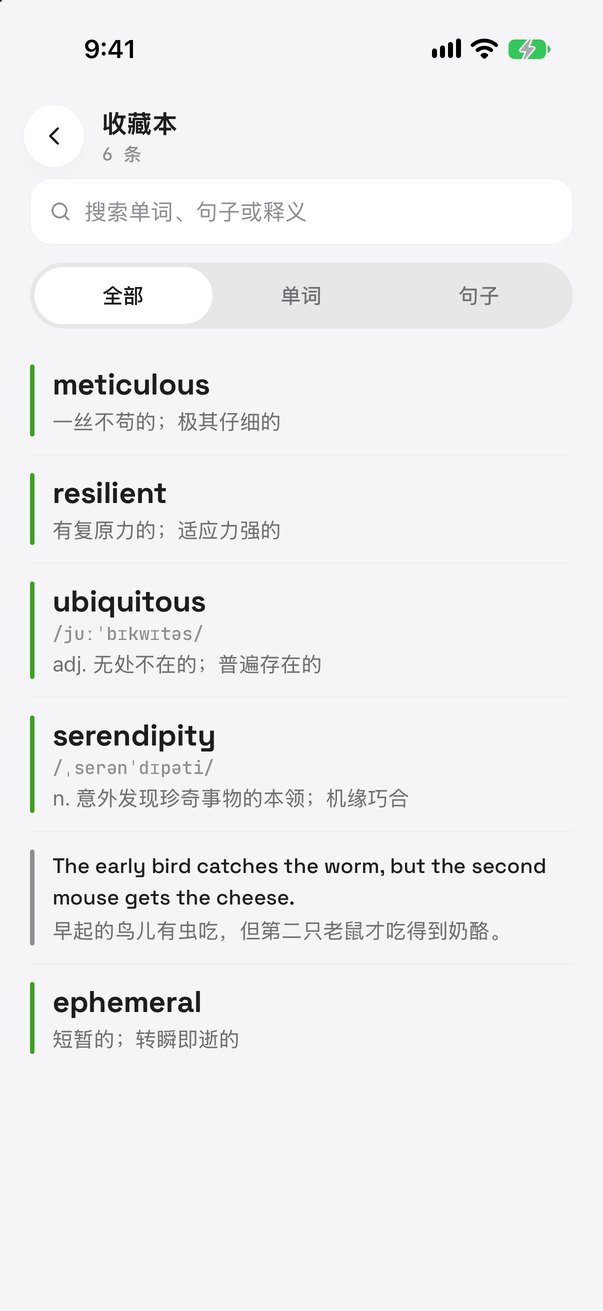
Tap the star when you translate on your Mac, and the word or the whole sentence lands in your iPhone’s saved list. Filter by words or sentences, or search.
Wordbooks
Exam wordbooks,
in your pocket.
Your saved words sit next to the wordbooks you are studying, each with its progress and new words per day. English has exam wordbooks, and Japanese, Korean, Spanish, French and German have starter books.

Review
One card,
one word.
One card at a time: say the meaning in your head, mark it known or not, then see the definition and hear it. Words you missed come back in minutes; words you knew come back the next day.


Start by saving
your first word on the Mac.
Download QuipJot for Mac, save a word while you read, then sign in on your iPhone with the same account.